When Your Home’s Temperature Control Goes Silent
Thermostat won’t turn on issues are a common frustration. When you find a blank or unresponsive thermostat screen, it can leave your home uncomfortably hot or cold. The good news is that most power issues have simple, fixable causes.
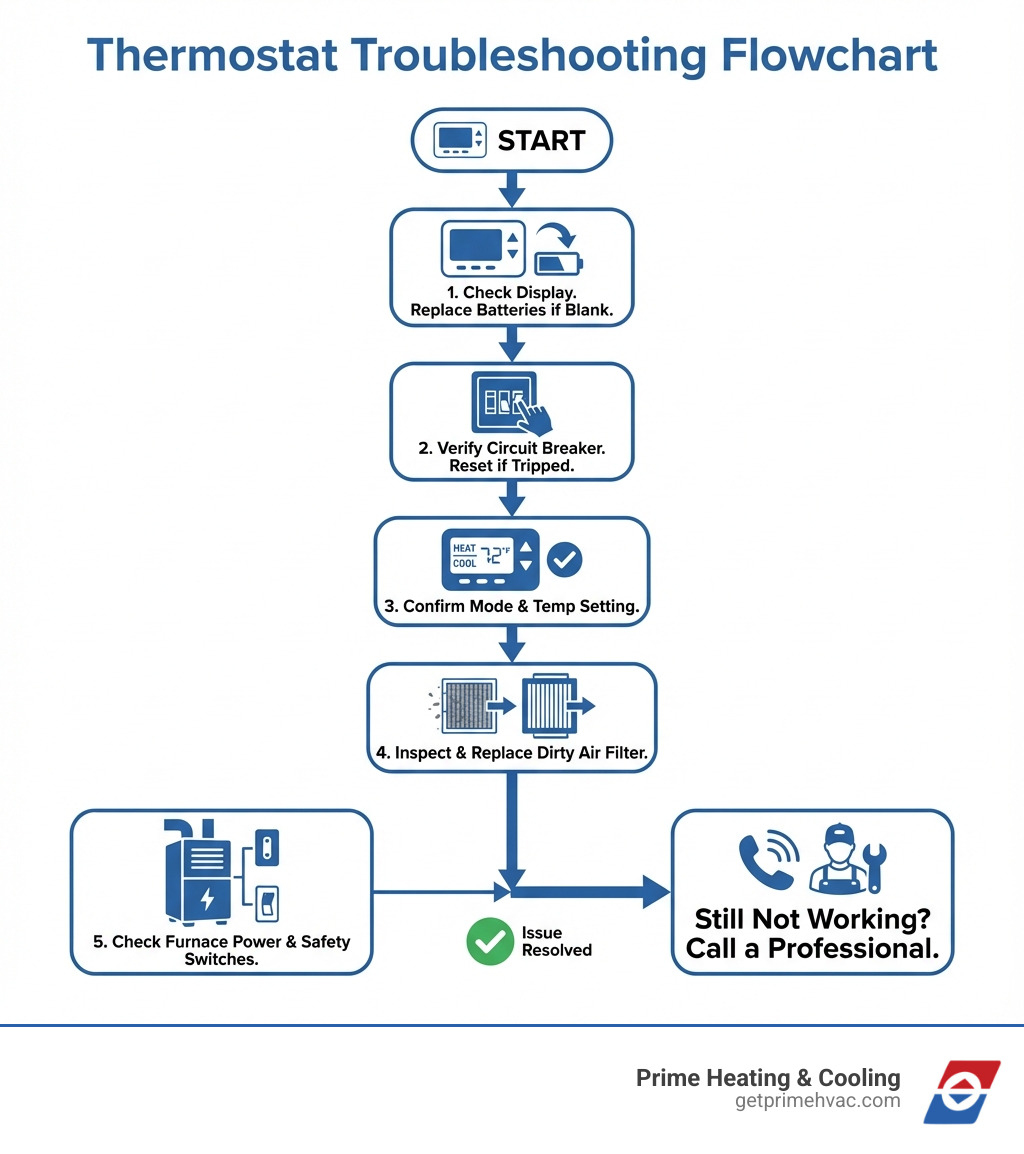
Quick troubleshooting steps when your thermostat won’t turn on:
- Replace the batteries – Many thermostats just need fresh batteries.
- Check your circuit breaker – Look for a tripped breaker in your electrical panel.
- Verify thermostat settings – Ensure it’s set to “Heat” or “Cool,” not “Off.”
- Inspect your air filter – A clogged filter can shut down your HVAC system.
- Check the furnace power switch – Make sure it wasn’t turned off by accident.
A blank display means your thermostat isn’t getting power—from batteries, your home’s electrical system, or the HVAC unit itself. A thermostat acts as the messenger to your heating and cooling system; when that communication breaks, your comfort system fails. For smart thermostats, the problem could be Wi-Fi or a missing C-wire for continuous power. Sometimes, the thermostat itself fails, especially if it’s over 10 years old.
I’m Tyler Steiner, founder of Prime Heating & Cooling. I’ve diagnosed countless thermostat won’t turn on issues across Rhode Island and Massachusetts. Most are simple fixes like a battery change or breaker reset, but knowing when to call a professional can prevent a small problem from becoming an expensive repair.
The First Responders: Checking Power and Settings
When your thermostat won’t turn on, the first things to check are its power source and settings. These are often the simplest fixes, and we’ve seen many homeowners in places like Smithfield, Providence, and Franklin resolve their issues with these few steps.
Here are the initial checks to perform:
- Check Thermostat Batteries and Power Source: This is the top culprit for a blank display.
- Inspect Your Home’s Circuit Breaker: No power to the HVAC system means no power to the thermostat.
- Verify Thermostat Settings and Programming: A simple setting might be causing the confusion.
Let’s explore each of these.
Check Thermostat Batteries and Power Source
Battery-Powered Thermostats:
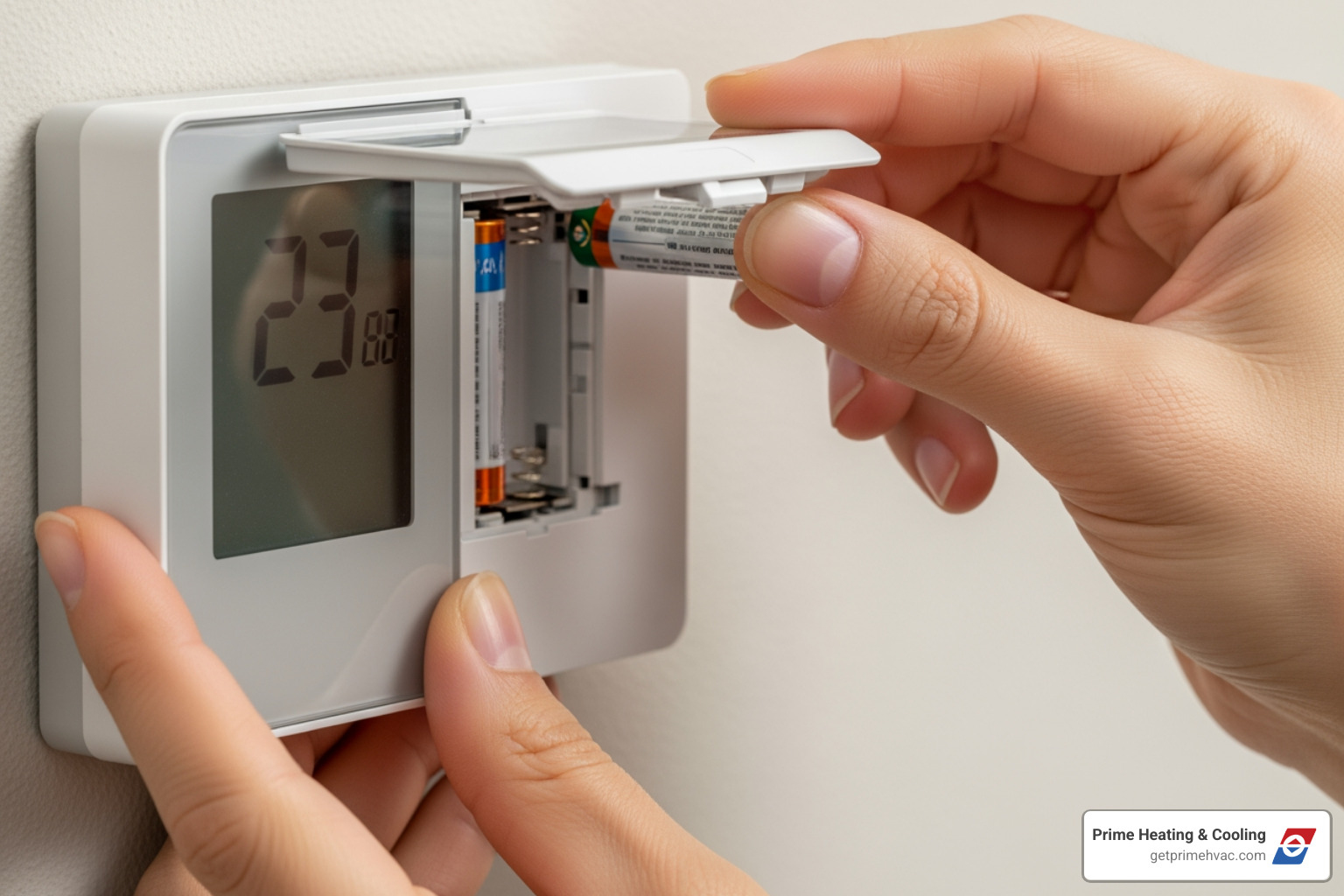
If your thermostat has a blank display, dead batteries are the most likely reason. Most use AA or AAA alkaline batteries. We recommend replacing these annually. Some thermostats provide a low battery warning, but others just go dark. When replacing, use new, high-quality alkaline batteries and ensure the polarity (+/-) is correct.
Wired Thermostats:
Many thermostats draw low-voltage power (24 volts) directly from your HVAC system’s transformer. A blank display on a wired thermostat indicates a power loss from the system, which could be due to a tripped breaker, a faulty transformer, or wiring issues.
Smart Thermostats and the C-Wire:
Smart thermostats like Google Nest often need a continuous 24-volt power supply from a common wire, or “C-wire,” for their advanced features. While some can “power-steal,” a C-wire is more reliable. If your smart thermostat frequently goes dark or shows a low battery warning, it may need a C-wire. We can install one or use an accessory like the Nest Power Connector to solve this. You can learn more about how these devices optimize your home’s energy use in our article on More info about smart thermostats.
To troubleshoot power issues:
- Replace Batteries (if applicable): Remove the cover, take out the old batteries, and insert fresh ones correctly.
- Charge Smart Thermostats (if applicable): Some smart thermostats may need to be removed from the wall and charged directly with a USB-C cable if the battery is critically low.
Inspect Your Home’s Circuit Breaker
If batteries aren’t the issue, check your home’s electrical panel. Your HVAC system has a dedicated circuit, and if it trips, it cuts power to the entire system, including the thermostat.
What to look for:
- Tripped Breaker: In your electrical panel, look for a breaker switch in the “off” or an intermediate position.
- Blown Fuse: Older homes may have a fuse box. A blown fuse will cut power, and if it blows repeatedly, it signals a deeper electrical problem needing professional repair.
How to reset a breaker:
To reset a tripped breaker, push the switch firmly to “off,” then back to “on.” If it trips again immediately, do not force it. This indicates an electrical fault that requires a professional. Always prioritize safety; if you’re unsure, call a technician. We cover more troubleshooting steps in our How to Troubleshoot a Thermostat That Won’t Work — Prime Heating & Cooling guide.
Verify Thermostat Settings and Programming
Sometimes, the problem is just an incorrect setting. We see this often in homes throughout East Greenwich and Lincoln.
Here’s what to check:
- Heat Mode vs. Cool Mode: Ensure your thermostat is set to the correct mode. If it’s winter and set to “Cool” or “Off,” it won’t call for heat.
- Fan Setting (Auto vs. On): If the fan is set to “On,” it will blow air constantly, even unheated air. For heating, we recommend the “Auto” setting, so the fan only runs when the system is actively heating.
- Temperature Setting: Your heating won’t turn on if the thermostat thinks the room is already warm enough. Set the desired temperature higher than the current room temperature.
- Programmable Schedule: A programmed schedule might be lowering the temperature. Use the “Hold” or “Temporary Override” function to bypass it. If your thermostat frequently forgets settings, it may be failing.
- Vacation Mode: Check that a “Vacation” or “Away” mode isn’t accidentally activated, as this reduces heating to save energy.
If you’ve checked these settings and your thermostat won’t turn on the heat, it’s time to investigate the system itself.
Why Your Thermostat Won’t Turn On: Deeper System Checks
If power and settings are correct, the investigation moves to the HVAC system itself. The thermostat might be working, but the furnace or heat pump isn’t responding due to an internal problem like a clogged filter or a tripped safety switch.
Inspect the HVAC Air Filter
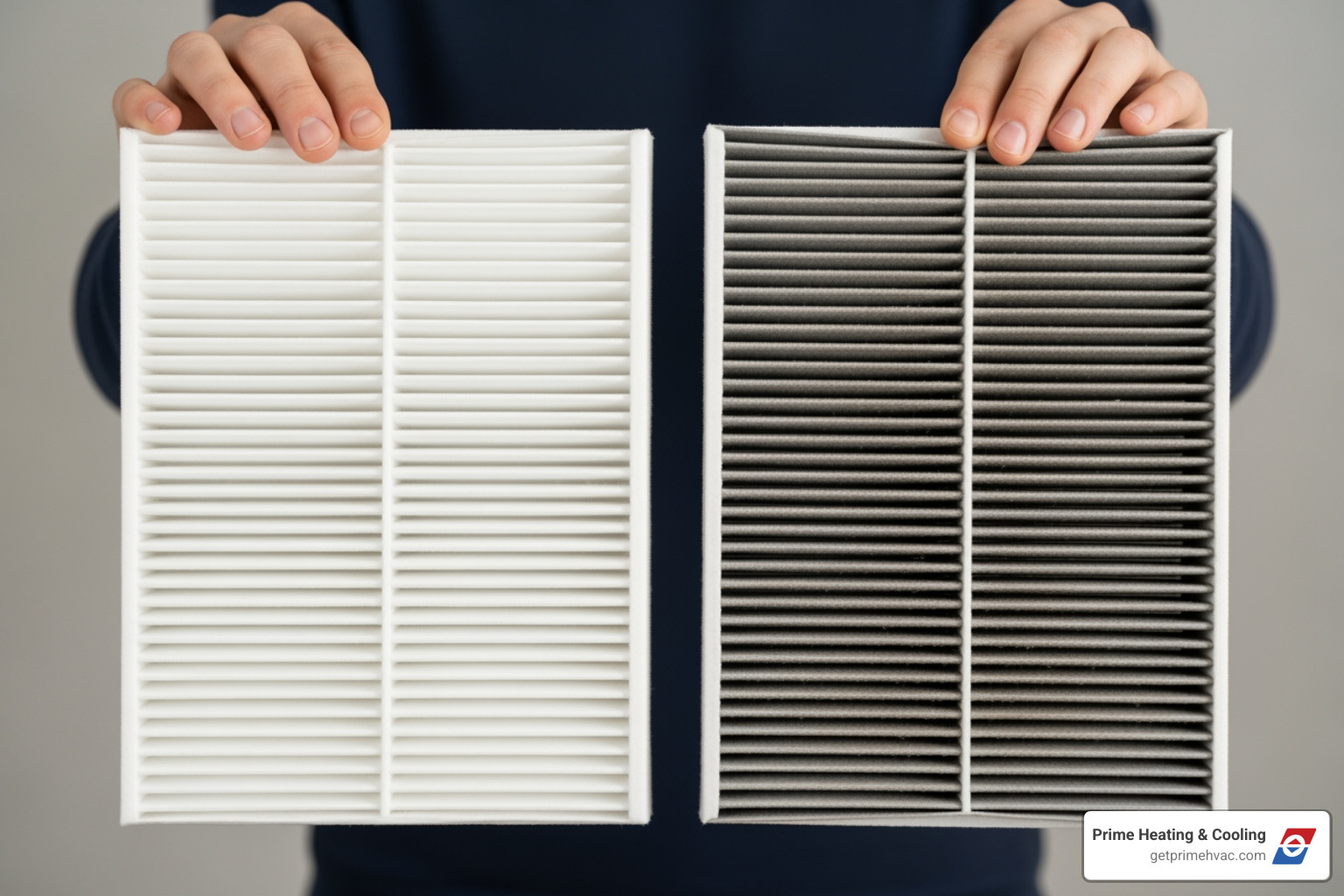
A dirty air filter is a common and preventable cause of furnace failure. We always remind our clients in places like Warwick and North Providence about regular filter changes.
Here’s why a clogged air filter matters:
A clogged filter restricts airflow, forcing your furnace to work harder and overheat. To prevent damage, a high-temperature safety switch will shut the unit down. This makes it seem like the thermostat is the problem, but it’s actually the furnace protecting itself from a fire hazard. This is why your thermostat won’t turn on the heat.
Filter Replacement Schedule:
Check your air filter monthly and replace it every 1-3 months, especially during heavy use, if you have pets, or if someone has allergies. Clean filters can lower energy use by 5-15%. For more on filter maintenance, see our insights on Signs Your Air Conditioner Needs Repair: Don’t Ignore These Red Flags.
Action:
Locate your furnace’s filter compartment, remove the filter, and if it’s dirty, replace it with a clean one of the correct size.
Check the Furnace or Air Handler
If your thermostat seems fine, the problem may be with the furnace or air handler itself.
What to check:
- Furnace Power Switch: Most furnaces have a power switch on or near the unit. Ensure this switch is “On,” as it can be accidentally flipped off.
- Blower Compartment Door: On high-efficiency furnaces, a safety switch prevents operation if the blower compartment door isn’t securely closed.
- Pilot Light (Older Furnaces): Older gas furnaces have a pilot light that can go out. Your manual will have instructions for relighting it. Modern furnaces use an electronic ignitor, which can fail and prevent the furnace from starting.
- Error Codes on Furnace: Many modern furnaces have an LED light that flashes error codes. Check your manual to understand what they mean.
- Unusual Noises: Strange noises like clicking, grinding, or humming can indicate mechanical problems that need a professional.
- Fuel Supply: For gas furnaces, ensure the gas valve is open. For oil furnaces, check the tank level.
If you’ve fixed an issue here, try your thermostat again. If your thermostat won’t turn on the furnace after these checks, the problem is likely more complex. Our article What to Do If Your Thermostat Isn’t Working provides more details.
Is Your Thermostat the Real Culprit? Signs of a Faulty Unit
If you’ve checked everything else and the heat still won’t turn on, the thermostat itself might be faulty. Like any electronic device, they have a limited lifespan and can fail.
Signs of a Faulty Thermostat
Here are some red flags we often see in homes across Rhode Island and Massachusetts:
- Blank Display (After Power Check): If you’ve checked batteries and breakers and the display is still blank, the unit has likely failed internally.
- Unresponsive Screen/Buttons: The controls are frozen or don’t register your commands.
- Incorrect Temperature Reading: The temperature reading is wrong. Check it with a separate thermometer. A significant difference suggests a faulty sensor. Also, ensure it’s not in direct sunlight or near a vent, which can cause inaccurate readings.
- Short Cycling: The system turns on and off rapidly. While other issues can cause this, a faulty thermostat sending incorrect signals is a common reason.
- System Won’t Turn Off: If your furnace or AC runs continuously, ignoring the set temperature, the thermostat may have a faulty relay.
- Forgetting Programmed Settings: If your thermostat keeps losing its schedule, its internal memory or power supply might be failing.
A faulty thermostat reduces HVAC efficiency and increases utility bills. Learn more in our article: How a Faulty Thermostat Affects Your AC System: Repair and Solutions.
How to Reset Your Thermostat
A simple reset can often fix glitches, much like rebooting a computer. The process varies by thermostat type.
- Digital Thermostat Reset: Look for a small, recessed “Reset” button that you can press with a paperclip.
- Battery Removal Reset: For battery-powered models, remove the batteries for 30 seconds, then reinsert them.
- Smart Thermostat Reset (App/Menu): Reset through the on-screen menu or smartphone app. A factory reset will erase all settings.
- Hardwired Thermostat Reset (Breaker): Turn off power to the HVAC system at the circuit breaker for one minute, then turn it back on.
Note: Resetting will likely erase your programmed schedules, which you will need to re-enter.
Advanced Reasons a Thermostat Won’t Turn On
If a reset doesn’t work, the problem may be more advanced. These issues typically require a professional.
- Loose Wiring: Vibrations can loosen thermostat wires, disrupting signals.
- Corroded Terminals: Corrosion on wiring terminals can disrupt the electrical signal.
- Faulty Internal Components: Internal parts like the circuit board or sensors can fail, requiring thermostat replacement.
- Miscalibration: Severe miscalibration can make the thermostat ineffective.
- Damaged Low-Voltage Wiring: Wires running to your furnace can be damaged by pests or age, cutting off communication.
- Bad Transformer: A failed transformer in your furnace will cut power to the thermostat.
- Blown Fuse in HVAC System: Your furnace’s internal control board may have its own fuse. If it blows, it will cut power to the thermostat.
Diagnosing these issues requires specialized tools. If you’re uncomfortable with electrical work, it’s safer to contact us. Our team at Prime Heating & Cooling serves all of Rhode Island and Massachusetts, including areas like Johnston, Scituate, and Smithfield. Find more tips in our DIY AC Troubleshooting: How to Fix Common Cooling System Issues.
Frequently Asked Questions about Thermostat Issues
We get many questions from homeowners in Smithfield, Coventry, and North Smithfield about why their thermostat won’t turn on. Here are some common ones.
How do I know if the problem is my thermostat or my furnace?
This can be tricky. Here are some diagnostic clues:
- Thermostat clicks, but no heat: The thermostat is likely working, but the furnace isn’t responding. This points to a furnace issue (power, ignitor, motor).
- Complete silence: This could be a power issue affecting the whole system (like a tripped breaker) or a dead thermostat.
- Blower runs, but air is cold: The thermostat is working, but the furnace isn’t creating heat. This indicates a problem with the furnace’s ignitor, flame sensor, or fuel supply.
- Test the fan: Set the fan to “On.” If it runs, the thermostat can communicate with the system, and power is reaching the fan. If not, it suggests a wider power or communication problem.
If the problem persists, especially if your furnace is short-cycling, consult our guide on Furnace Keeps Turning On and Off or call a professional.
How often should thermostat batteries be replaced?
We strongly recommend replacing the batteries in your thermostat annually. A good time to do this is when you change your furnace filter in the fall.
- Low Battery Warning: Many thermostats display a low battery warning. Replace them as soon as you see it.
- Proactive Maintenance: Replacing batteries proactively prevents unexpected shutdowns.
- Using High-Quality Alkaline Batteries: Stick with reputable brands of alkaline batteries. Avoid rechargeable batteries unless your thermostat’s manual specifically says they are compatible.
What are the benefits of upgrading to a smart thermostat?
If your thermostat is failing, upgrading to a smart thermostat offers many benefits for comfort and savings, which we’ve seen homeowners in Franklin and the East Side of Providence enjoy.
- Energy Savings: According to ENERGY STAR, smart thermostats can save homeowners significant money on their heating and cooling bills.
- Remote Control via App: Control your home’s temperature from anywhere using a smartphone app.
- Learning Capabilities: They learn your preferences and adjust automatically for effortless comfort.
- Maintenance Reminders: Some models send filter change reminders or alert you to potential system issues.
- Improved Comfort Control: Enjoy more precise temperature control and a consistently comfortable home.
- Reduced Carbon Footprint: By optimizing energy use, smart thermostats help create a more environmentally friendly home.
While the initial investment is higher, the savings and convenience make a smart thermostat a worthwhile upgrade.
Conclusion: Restore Your Comfort or Call for Backup
A thermostat that won’t turn on is a major inconvenience. However, as we’ve explored, many causes—dead batteries, tripped breakers, wrong settings, or a clogged air filter—are simple DIY fixes that can save you a service call.
However, there’s a point where DIY troubleshooting should stop. If you’ve followed these checks and your heating system remains unresponsive, or if you encounter any of the following, it’s time to call for backup:
- Electrical Safety Concerns: You’re uncomfortable working with your electrical panel or wiring.
- Persistent Tripped Breakers: The breaker for your HVAC system keeps tripping after a reset.
- Complex System Problems: You hear unusual noises from your furnace, see error codes, or suspect internal component issues.
- No Resolution: You’ve exhausted all basic troubleshooting, and your thermostat won’t turn on the heat.
Our skilled technicians at Prime Heating & Cooling are experts in diagnosing and repairing all types of thermostat and HVAC system issues. With 20 years of experience serving Rhode Island and Massachusetts communities like Lincoln, Warwick, and North Scituate, we provide reliable, energy-efficient solutions and are available 24/7 for emergencies.
Regular maintenance is also key. Scheduling annual HVAC check-ups ensures your system is clean, efficient, and less likely to fail unexpectedly.
Don’t let a “dead” thermostat leave you in the cold. Troubleshoot what you can, and know that our team is always here to help. For expert assistance, refer to our Expert Thermostat Repair and Installation Guide.